Pular para o conteúdo
Menu

Componentes

time range

Explore prévias interativas, encontre os componentes ideais e incorpore componentes abertos ao seu projeto com o código-fonte incluído.

Compare estes componentes

Escolha pelo comportamento e pelo layout; depois confira os frameworks disponíveis e os requisitos de acesso na página de cada componente.

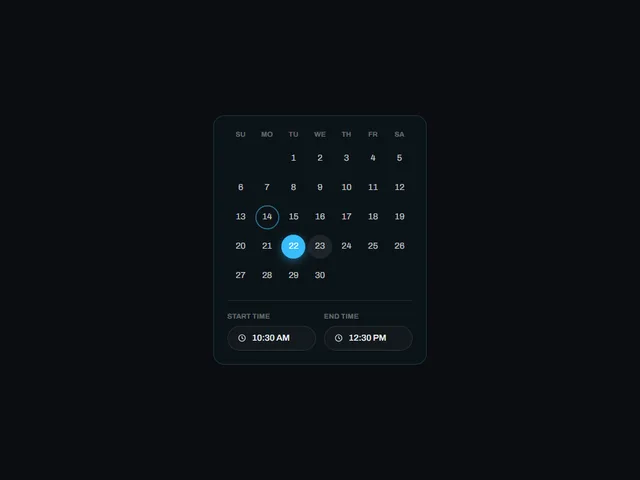
  • Appointment Range Card

    Um cartão que combina uma grade de data de um único mês com um campo de hora de início e de término abaixo dela, para escolher um dia mais uma janela de tempo em um bloco compacto.

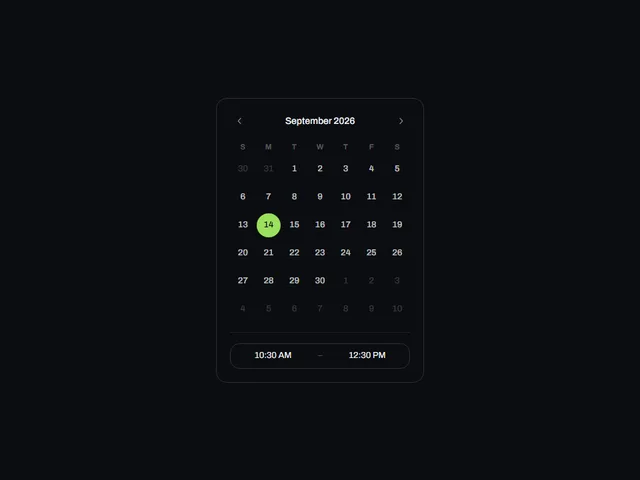
  • Compact Time Range Picker

    Um cartão de calendário mensal com uma faixa de intervalo de tempo de duas células no rodapé, os dois campos de tempo divididos apenas por um pequeno traço para que o par seja lido como um controle de intervalo.

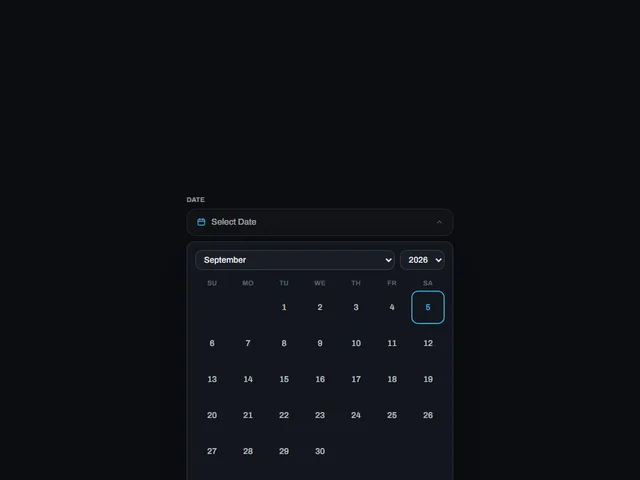
  • Dropdown Date Time Picker

    Um campo de data rotulado que abre um calendário mensal em um menu suspenso, emparelhado com dois campos de horário simples abaixo para um horário de início e de término.

Orientações de design
Abrir o índice completo
Etiquetas
3d (16)accessible (4)accordion (9)action (3)actions (6)activity (5)add (7)admin (12)agent (12)alert (8)align (3)ambient (39)analytics (13)anchored (3)animated (82)animation (4)annotation (3)app shell (3)arc (4)arcs (3)area (12)area chart (4)arrow (32)audio (3)aurora (4)auth (11)authentication (12)auto height (4)autocomplete (4)avatar (10)avatars (3)axis (5)backdrop (18)backer (3)background (54)badge (21)band (6)banner (9)bar (16)bar chart (3)bars (6)beam (6)beams (5)bevel (12)bezel (3)billing (10)bin (3)blend (4)blob (4)blobs (3)bloom (10)blur (15)booking (9)bookmark (3)border (16)bounce (6)brackets (3)breadcrumb (4)breathing (3)broadcast (3)burst (7)busy (5)button (397)button group (5)buttons (4)calendar (32)call to action (11)callout (3)canvas (89)capsule (12)caption (8)card (35)cards (7)caret (5)carousel (11)cascade (3)category (3)cells (4)chain (3)characters (4)chart (59)chat (4)check (3)checkbox (13)checklist (7)checkmark (5)chevron (10)chip (22)chips (4)circle (9)circular (5)click (7)clip (9)clipboard (3)close (4)cloud (3)cluster (3)code (6)collapse (11)collapsible (6)collision (3)column (4)columns (3)combobox (4)command palette (3)commercial (10)compact (8)comparison (8)composer (4)concentric (4)confetti (4)confirm (24)confirmation (7)console (5)contact (3)context menu (4)controlled-state (18)copy (4)corner (6)corners (7)count (7)count-up (3)counter (18)crossfade (5)crosshair (6)cta (28)cue (4)cursor (26)curtain (7)curve (4)customer (13)cycle (6)dark (15)dark mode (4)dashboard (9)dashed (5)data (13)date picker (16)date range (13)deck (3)delay (5)delete (8)depth (32)destructive (9)destructive-action (4)device mockup (3)diagonal (13)diagram (3)dial (5)dialog (17)digits (5)direction (5)disc (5)disclosure (8)dismiss (6)displacement (3)distortion (5)divider (4)dock (4)donut (7)dots (15)download (10)drag (21)draw (3)drawer (10)drift (17)dropdown (18)dropdown menu (3)duration (3)easing (4)echo (3)edge (7)edge light (3)editor (3)elastic (8)elevation (6)ellipsis (3)email (3)emboss (4)emphasis (3)empty state (3)entrance (14)error state (3)events (3)exit (3)expand (23)explorer (3)fade (9)falling (3)falloff (4)fan (6)faq (4)feed (3)feedback (12)field (6)fill (46)film (3)filter (13)finance (10)flat (6)flat shadow (3)flight (3)flip (10)floating panel (4)flood (14)flow (5)fluid (3)flyout (3)focus (19)focus ring (5)focus trap (6)folder (5)follow (11)form (47)form-control (12)formatting (3)frame (19)gallery (15)game (3)gap (4)gauge (5)gesture (6)ghost (7)glare (3)glitch (9)glow (39)glyph (7)gradient (38)grain (10)gravity (3)grid (35)group (8)guide (3)hairline (8)halftone (4)halo (15)hamburger (4)hard shadow (6)heading (8)headline (19)hero (11)hexagon (3)highlight (22)hinge (4)hint (12)hold (6)horizon (3)horizontal (4)hover (251)hover card (10)hover reveal (3)icon (121)icon-button (23)icons (4)identity (3)indeterminate (4)indicator (9)inertia (4)initials (3)ink (4)inline (5)input (20)input group (3)inset (11)interactive (50)invert (26)italic (3)key (11)keyboard (20)keyboard navigation (6)keycap (10)knob (4)kpi (5)label (14)label reveal (3)label swap (9)labels (7)lag (4)lattice (4)launch (3)layered (9)layers (3)layout (18)ledge (6)legend (9)lens (4)letters (10)lift (19)light (22)lightbox (4)like (4)line (11)line chart (4)lines (8)link (11)link preview (7)liquid (7)list (13)live (3)loader (9)loading (27)log (3)login (10)loop (42)magnet (5)magnetic (3)magnify (3)map (4)marker (3)markers (6)marquee (8)mask (9)matrix (4)media (4)menu (23)merge (3)mesh (5)message (4)metal (10)meter (5)metric (10)metrics (5)minimal (10)modal (19)monospace (12)monthly (12)morph (14)motion (3)motion tuning (3)moulded (6)multi-select (4)nav (3)navbar (3)navigation (21)nested (7)neutral (4)night (4)noise (16)notification (3)notifications (4)nudge (4)number (11)odometer (5)offset (7)on-off (4)onboarding (3)one time code (5)options (5)orb (4)orbit (13)otp (3)outline (63)outlined (4)overflow (7)overlay (24)overshoot (3)page (18)palette (3)panel (31)panels (6)paper plane (4)paragraph (3)parallax (15)particles (18)paste (3)path (4)pattern (9)percentage (4)perimeter (3)perspective (20)photo (5)physics (5)picker (3)pie (7)pill (83)pill switch (4)pin (3)pinned (3)pixel (3)placeholder (4)plane (5)plate (9)play (4)playful (7)pointer (65)polar (8)pop (4)popover (17)post card (3)power (3)press (77)pressed (6)pricing (3)primitive (4)print (4)product (6)profile (8)progress (27)proportion (4)providers (4)pulse (17)queue (3)quiet (5)radar (9)radial (8)radio (4)radio group (8)raised (3)ramp (5)ranking (3)rays (4)readout (4)record (4)registration (3)relay (3)relief (6)remove (3)reorder (3)resize (4)restore (3)retro (4)retry (3)reveal (80)ribbon (6)rim (8)ring (25)rings (10)ripple (18)rise (3)roll (6)rotate (21)rotating text (4)rotation (6)round (5)rounded (3)row (11)rows (4)save (5)scale (20)scan (5)scatter (4)scheduler (3)scramble (5)screen (3)screenshot frame (3)scroll (38)scrub (5)search (8)section (4)sections (4)segmented (7)segmented control (12)select (5)selection (5)send (23)sequence (8)series (7)settings (21)shadow (28)shape (3)share (25)shared element (4)sheen (14)sheet (4)shell (3)shimmer (8)shine (5)shortcut (4)shuffle (3)shutter (5)sidebar (7)sign in (11)signal (8)signup (9)silhouette (3)sizes (4)skew (9)slab (6)slide (20)slider (10)sliding highlight (7)sliding indicator (3)snap (4)social (6)soft (6)space (5)spark (3)sparkline (3)spin (15)spinner (9)split (9)split-flap (3)split text (3)spotlight (7)spring (63)square (5)squash (4)stack (17)stacked (7)stagger (40)staircase (3)star (3)stars (6)stat (5)state (11)static (3)status (21)stepper (3)steps (3)sticker (4)sticky (4)streaks (3)strikethrough (3)stripes (5)stroke (6)submenu (9)submit (7)subtle (3)success (3)surface (5)svg (102)swap (12)sweep (40)swell (4)swipe (5)swirl (3)switch (16)tabs (22)tactile (26)tap (4)target (3)task (3)team (5)terminal (3)text (40)text button (3)text-effect (3)text field (4)text transition (3)textarea (4)texture (11)theme (3)theme toggle (4)thumbnail (4)ticker (5)tile (16)tiles (12)tilt (26)time (3)time range (3)time series (3)timeline (3)timer (3)timing (5)tint (5)toggle (65)toggle group (10)toolbar (25)tooltip (37)total (3)touch (3)trace (4)tracking (6)trail (20)transition (6)translucent (9)travel (6)tray (3)tree (3)trend (10)trigger (4)tunnel (4)twinkle (4)typewriter (9)typing (8)typography (18)underline (10)upload (5)uppercase (14)validation (5)value (3)values (4)variants (4)velocity (3)verification (8)video (4)viewport (6)voice (3)warp (6)wash (5)wave (13)waveform (3)waves (7)window (3)wipe (23)wireframe (3)wireless (3)wobble (6)word swap (3)words (3)workflow (18)workspace (36)wrapper (3)zoom (4)