Aller au contenu
Menu

Composants

autocomplete

Explorez les aperçus interactifs, trouvez les bons composants et intégrez les composants ouverts à votre projet avec leur code source.

Comparer ces composants

Choisissez selon le comportement et la mise en page, puis vérifiez les frameworks disponibles et les conditions d’accès sur la page de chaque composant.

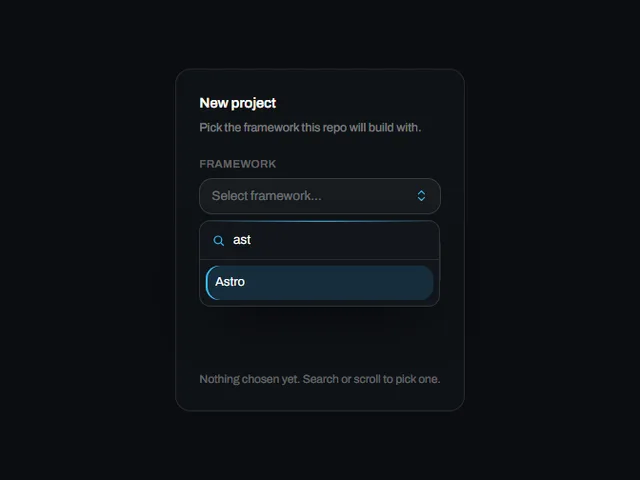
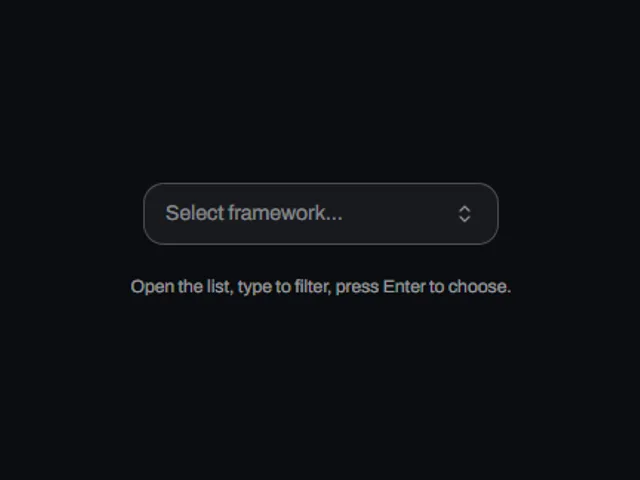
  • Combobox field

    Un champ déroulant consultable : la saisie filtre une liste d'options en direct et en choisir une remplit le champ.

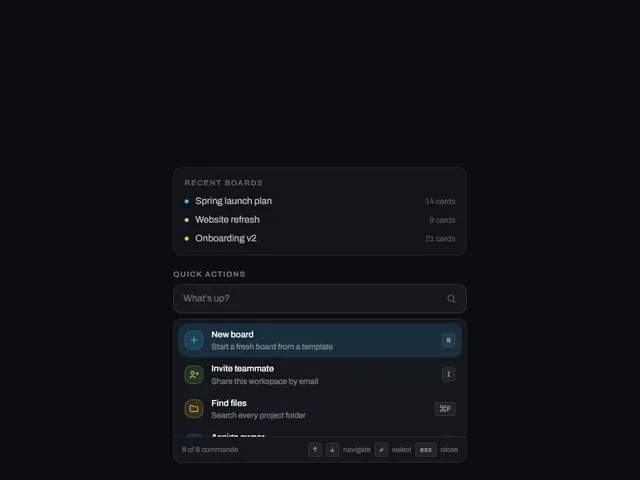
  • Command search palette

    Un champ de recherche qui dépose une liste filtrée de commandes sous lui-même au fur et à mesure que vous tapez, avec une mise en surbrillance des touches fléchées, une sélection au survol et un pied de page d'indication de clavier.

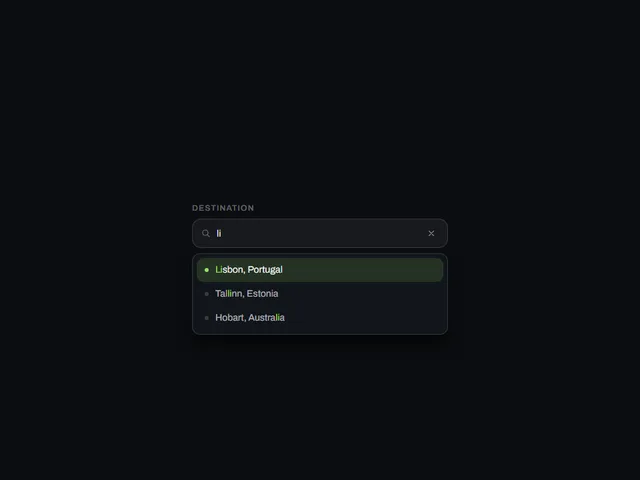
  • Filtered suggestion field

    Un champ de texte qui filtre une liste de suggestions au fur et à mesure que vous tapez et affiche les correspondances dans une liste déroulante ci-dessous, avec une navigation au clavier et un bouton clair.

Conseils de design
Ouvrir l’index complet
Étiquettes
3d (16)accessible (4)accordion (9)action (3)actions (6)activity (5)add (7)admin (12)agent (12)alert (8)align (3)ambient (39)analytics (13)anchored (3)animated (82)animation (4)annotation (3)app shell (3)arc (4)arcs (3)area (12)area chart (4)arrow (32)audio (3)aurora (4)auth (11)authentication (12)auto height (4)autocomplete (4)avatar (10)avatars (3)axis (5)backdrop (18)backer (3)background (54)badge (21)band (6)banner (9)bar (16)bar chart (3)bars (6)beam (6)beams (5)bevel (12)bezel (3)billing (10)bin (3)blend (4)blob (4)blobs (3)bloom (10)blur (15)booking (9)bookmark (3)border (16)bounce (6)brackets (3)breadcrumb (4)breathing (3)broadcast (3)burst (7)busy (5)button (397)button group (5)buttons (4)calendar (32)call to action (11)callout (3)canvas (89)capsule (12)caption (8)card (35)cards (7)caret (5)carousel (11)cascade (3)category (3)cells (4)chain (3)characters (4)chart (59)chat (4)check (3)checkbox (13)checklist (7)checkmark (5)chevron (10)chip (22)chips (4)circle (9)circular (5)click (7)clip (9)clipboard (3)close (4)cloud (3)cluster (3)code (6)collapse (11)collapsible (6)collision (3)column (4)columns (3)combobox (4)command palette (3)commercial (10)compact (8)comparison (8)composer (4)concentric (4)confetti (4)confirm (24)confirmation (7)console (5)contact (3)context menu (4)controlled-state (18)copy (4)corner (6)corners (7)count (7)count-up (3)counter (18)crossfade (5)crosshair (6)cta (28)cue (4)cursor (26)curtain (7)curve (4)customer (13)cycle (6)dark (15)dark mode (4)dashboard (9)dashed (5)data (13)date picker (16)date range (13)deck (3)delay (5)delete (8)depth (32)destructive (9)destructive-action (4)device mockup (3)diagonal (13)diagram (3)dial (5)dialog (17)digits (5)direction (5)disc (5)disclosure (8)dismiss (6)displacement (3)distortion (5)divider (4)dock (4)donut (7)dots (15)download (10)drag (21)draw (3)drawer (10)drift (17)dropdown (18)dropdown menu (3)duration (3)easing (4)echo (3)edge (7)edge light (3)editor (3)elastic (8)elevation (6)ellipsis (3)email (3)emboss (4)emphasis (3)empty state (3)entrance (14)error state (3)events (3)exit (3)expand (23)explorer (3)fade (9)falling (3)falloff (4)fan (6)faq (4)feed (3)feedback (12)field (6)fill (46)film (3)filter (13)finance (10)flat (6)flat shadow (3)flight (3)flip (10)floating panel (4)flood (14)flow (5)fluid (3)flyout (3)focus (19)focus ring (5)focus trap (6)folder (5)follow (11)form (47)form-control (12)formatting (3)frame (19)gallery (15)game (3)gap (4)gauge (5)gesture (6)ghost (7)glare (3)glitch (9)glow (39)glyph (7)gradient (38)grain (10)gravity (3)grid (35)group (8)guide (3)hairline (8)halftone (4)halo (15)hamburger (4)hard shadow (6)heading (8)headline (19)hero (11)hexagon (3)highlight (22)hinge (4)hint (12)hold (6)horizon (3)horizontal (4)hover (251)hover card (10)hover reveal (3)icon (121)icon-button (23)icons (4)identity (3)indeterminate (4)indicator (9)inertia (4)initials (3)ink (4)inline (5)input (20)input group (3)inset (11)interactive (50)invert (26)italic (3)key (11)keyboard (20)keyboard navigation (6)keycap (10)knob (4)kpi (5)label (14)label reveal (3)label swap (9)labels (7)lag (4)lattice (4)launch (3)layered (9)layers (3)layout (18)ledge (6)legend (9)lens (4)letters (10)lift (19)light (22)lightbox (4)like (4)line (11)line chart (4)lines (8)link (11)link preview (7)liquid (7)list (13)live (3)loader (9)loading (27)log (3)login (10)loop (42)magnet (5)magnetic (3)magnify (3)map (4)marker (3)markers (6)marquee (8)mask (9)matrix (4)media (4)menu (23)merge (3)mesh (5)message (4)metal (10)meter (5)metric (10)metrics (5)minimal (10)modal (19)monospace (12)monthly (12)morph (14)motion (3)motion tuning (3)moulded (6)multi-select (4)nav (3)navbar (3)navigation (21)nested (7)neutral (4)night (4)noise (16)notification (3)notifications (4)nudge (4)number (11)odometer (5)offset (7)on-off (4)onboarding (3)one time code (5)options (5)orb (4)orbit (13)otp (3)outline (63)outlined (4)overflow (7)overlay (24)overshoot (3)page (18)palette (3)panel (31)panels (6)paper plane (4)paragraph (3)parallax (15)particles (18)paste (3)path (4)pattern (9)percentage (4)perimeter (3)perspective (20)photo (5)physics (5)picker (3)pie (7)pill (83)pill switch (4)pin (3)pinned (3)pixel (3)placeholder (4)plane (5)plate (9)play (4)playful (7)pointer (65)polar (8)pop (4)popover (17)post card (3)power (3)press (77)pressed (6)pricing (3)primitive (4)print (4)product (6)profile (8)progress (27)proportion (4)providers (4)pulse (17)queue (3)quiet (5)radar (9)radial (8)radio (4)radio group (8)raised (3)ramp (5)ranking (3)rays (4)readout (4)record (4)registration (3)relay (3)relief (6)remove (3)reorder (3)resize (4)restore (3)retro (4)retry (3)reveal (80)ribbon (6)rim (8)ring (25)rings (10)ripple (18)rise (3)roll (6)rotate (21)rotating text (4)rotation (6)round (5)rounded (3)row (11)rows (4)save (5)scale (20)scan (5)scatter (4)scheduler (3)scramble (5)screen (3)screenshot frame (3)scroll (38)scrub (5)search (8)section (4)sections (4)segmented (7)segmented control (12)select (5)selection (5)send (23)sequence (8)series (7)settings (21)shadow (28)shape (3)share (25)shared element (4)sheen (14)sheet (4)shell (3)shimmer (8)shine (5)shortcut (4)shuffle (3)shutter (5)sidebar (7)sign in (11)signal (8)signup (9)silhouette (3)sizes (4)skew (9)slab (6)slide (20)slider (10)sliding highlight (7)sliding indicator (3)snap (4)social (6)soft (6)space (5)spark (3)sparkline (3)spin (15)spinner (9)split (9)split-flap (3)split text (3)spotlight (7)spring (63)square (5)squash (4)stack (17)stacked (7)stagger (40)staircase (3)star (3)stars (6)stat (5)state (11)static (3)status (21)stepper (3)steps (3)sticker (4)sticky (4)streaks (3)strikethrough (3)stripes (5)stroke (6)submenu (9)submit (7)subtle (3)success (3)surface (5)svg (102)swap (12)sweep (40)swell (4)swipe (5)swirl (3)switch (16)tabs (22)tactile (26)tap (4)target (3)task (3)team (5)terminal (3)text (40)text button (3)text-effect (3)text field (4)text transition (3)textarea (4)texture (11)theme (3)theme toggle (4)thumbnail (4)ticker (5)tile (16)tiles (12)tilt (26)time (3)time range (3)time series (3)timeline (3)timer (3)timing (5)tint (5)toggle (65)toggle group (10)toolbar (25)tooltip (37)total (3)touch (3)trace (4)tracking (6)trail (20)transition (6)translucent (9)travel (6)tray (3)tree (3)trend (10)trigger (4)tunnel (4)twinkle (4)typewriter (9)typing (8)typography (18)underline (10)upload (5)uppercase (14)validation (5)value (3)values (4)variants (4)velocity (3)verification (8)video (4)viewport (6)voice (3)warp (6)wash (5)wave (13)waveform (3)waves (7)window (3)wipe (23)wireframe (3)wireless (3)wobble (6)word swap (3)words (3)workflow (18)workspace (36)wrapper (3)zoom (4)